게시글을 작성하기 위해
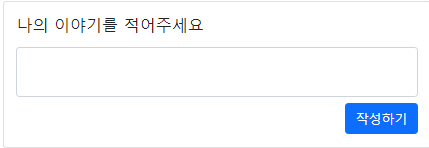
요 부분을 수정할 것이다.
tweet/home.html
수정 전
<div class="media-body">
    <h5 class="mt-0">나의 이야기를 적어주세요</h5>
    <p>
    <form>
        <div class="form-group mb-2">
            <textarea class="form-control" style="resize: none" name='my-content' id="my-content"></textarea>
        </div>
        <button type="submit" class="btn btn-primary" style="float:right;">작성하기</button>
    </form>
    </p>
</div>
수정 후
<div class="media-body">
    <h5 class="mt-0">나의 이야기를 적어주세요</h5>
    <p>
    <form action="/tweet/" method="post">
        {% csrf_token %}
        <div class="form-group mb-2">
            <textarea class="form-control" style="resize: none" name='my-content' id="my-content"></textarea>
        </div>
        <button type="submit" class="btn btn-primary" style="float:right;">작성하기</button>
    </form>
    </p>
</div>
tweet/urls.py에는 이미 작성이 되어있기에 views.py로 넘어가준다.
tweet/views.py
from .models import Tweet

def tweet(request):
    elif request.method == 'POST':
        user = request.user
        my_tweet = Tweet()
        my_tweet.author = user
        my_tweet.content = request.POST.get('my-content', '')
        my_tweet.save()
        return redirect('/tweet')
저장이 되어있는지 database에 들어가보면

뭔가 들어오긴 했다. my_content로 오타를 내었다... 저런....
수정을 해주고

정상적으로 들어왔음을 확인할 수 있다.
그럼 바꿔주자.
오른쪽 클릭 delete row하면 그대로 남아있는걸 볼수 있는데 오른쪽 위에 초록 화살표를 눌러 submit을 해주고 다음에 refresh를 하면! id가 2로 되어있을태니 1로 바꿔주자

'Django > Django Vanila' 카테고리의 다른 글
| 10. Django 데이터베이스 관계 (0) | 2022.05.30 |
|---|---|
| 9. Django 게시글 읽기/삭제 (0) | 2022.05.27 |
| 7. Django 로그인 이후 기능 (0) | 2022.05.27 |
| 6. Django에서 제공하는 사용자 기능 (0) | 2022.05.27 |
| 5. Django 사용자 관리와 로그인 (0) | 2022.05.26 |


